OAuth 2.0 and SSO Support Across MCP Control Planes
Enterprise identity systems weren't built for autonomous agents making API calls.

MCP has become the default wiring for connecting AI agents to tools and data, and enterprise teams picked it up faster than the identity plumbing could keep pace. Public server counts have climbed past 10,000 by March 2026, and most production AI deployments now run some version of the protocol. OAuth 2.1 gives MCP a rulebook, but four of its requirements, mandatory PKCE, dynamic client registration, protected resource metadata, and resource-bound tokens, don't map onto identity stacks built for humans typing passwords into web apps. No existing system satisfies all four cleanly, so the burden falls on whoever runs the MCP gateway. Nobody chose this on purpose. It's what happens when you bolt a protocol built for autonomous agents onto plumbing designed for people clicking "remember me."
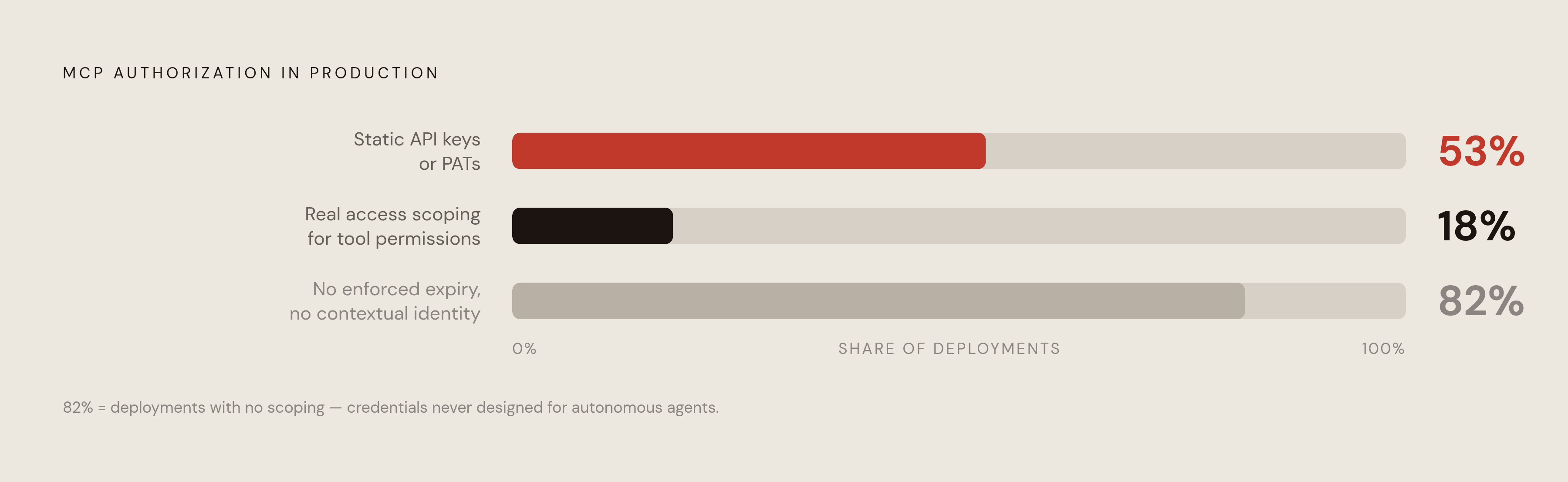
The gap appears in the numbers. Only about 18% of MCP server deployments implement any real access scoping for tool permissions, while 53% still lean on static API keys or personal access tokens, credentials that don't expire on any schedule anyone tracks and carry none of the context needed to know who's actually behind a request. That's the starting point. What follows is how the protocol handles authorization, where the three-way split in agent types breaks any one-size-fits-all flow, and why identity vendors and gateway operators are racing to fill the space in between. Spoiler: the vendors are closer to a fix than the standards process is, and gateways are doing more real work than either.
How MCP's two-step discovery flow works
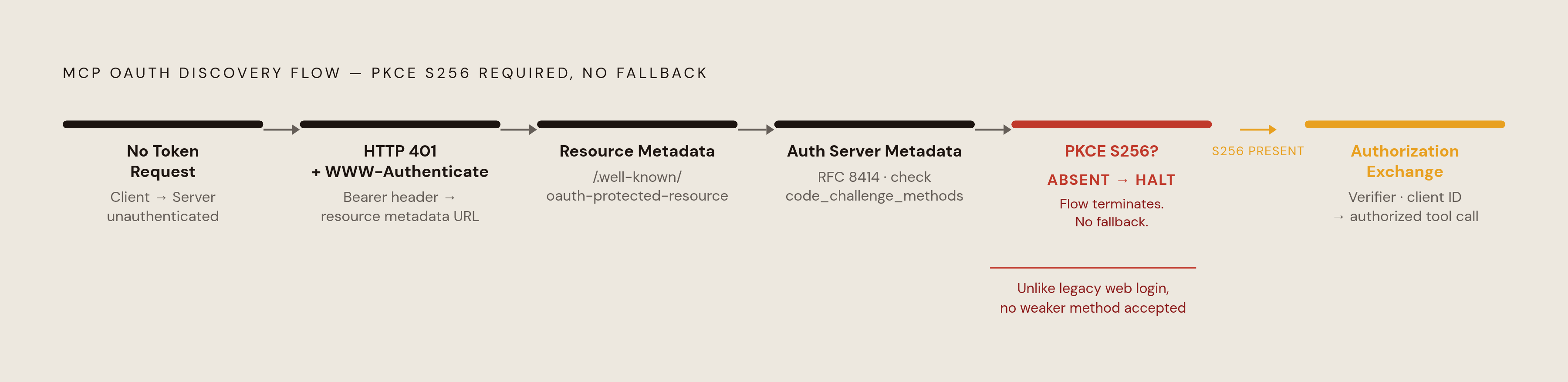
A client makes a request to an MCP server without a token. The server doesn't reject it quietly: it responds with an HTTP 401 and a WWW-Authenticate: Bearer header pointing to a resource metadata URL. The client follows that pointer to a /.well-known/oauth-protected-resource document, which names the resource, lists which authorization servers can issue valid tokens for it, and states the scopes on offer.
From there the client makes a second stop, fetching the authorization server's own metadata at /.well-known/oauth-authorization-server, a lookup defined by RFC 8414. This is where it checks code_challenge_methods_supported. If PKCE isn't listed, the client stops right there. No fallback, no plain-text negotiation. Assuming PKCE is present, the client generates a verifier, registers or resolves a client ID, and moves into the authorization exchange.
Two design choices set this apart from a typical web login. First, MCP dropped protocol-level sessions entirely: the old Mcp-Session-Id header and the initialize handshake are gone. Every request carries its own authorization on its own. There's no persistent session to lean on. Second, the whole exchange plays out per resource, not per login. A gateway sitting in front of a fleet of MCP servers has to treat every call as its own discovery event; it can't assume that because a user logged in once, every downstream tool call is covered. That single design decision is what drags identity infrastructure into the request path itself, instead of letting it sit off to the side as a one-time gatekeeper.
Three authorization patterns MCP must support
The discovery flow above is the mechanism. On its own it doesn't tell a server what kind of identity is on the other end of the request, and without that distinction the server has no way to pick the right validation rules.
MCP's authorization model, as analyzed by Aembit, splits into three genuinely different patterns. Treating them as interchangeable is where most deployments go wrong. User-delegated access covers a client acting on behalf of a specific person: Authorization Code plus PKCE, an interactive approval screen, access that stops exactly where that person's own permissions stop. Machine-to-machine access covers unattended agents running on a schedule with nobody watching, using the OAuth Client Credentials extension: no browser, no human to click approve, so the agent needs its own identity instead of borrowing someone else's. Enterprise-managed access covers the case where a person is technically at the keyboard, but the organization, not the individual, decides which servers and scopes are in play, handled through the Enterprise-Managed Authorization (EMA) extension.
Picture two AI assistants sitting on the same sales dashboard. One summarizes numbers when someone asks, mid-afternoon, on demand. The other runs the same summary automatically every morning at 6 a.m., before anyone's logged into anything. To the MCP server fielding the request, these look nearly identical: same tool call, same shape of request. One should carry a person's actual authority and stop wherever that person's access stops. The other needs its own standing identity with its own defined limits. Mix them up, and the scheduled job breaks every morning nobody's logged in yet, or the on-demand assistant ends up holding standing permissions nobody meant to grant it.
Neither OAuth 2.1 nor PKCE decides which pattern applies to a given request. The protocol hands over the mechanisms; something upstream, at the infrastructure or gateway layer, has to route each call into the right lane, and right now that routing logic doesn't live anywhere standard. The November 2025 spec update added weight to the problem instead of lightening it: mandatory S256 PKCE (plain PKCE is now banned outright), Client ID Metadata Documents (CIMD) formalized as the preferred registration method, and step-up authorization for incremental scope consent. All three additions make the protocol more expressive. All three also mean more configuration surface for whoever runs the gateway.
Where enterprise SSO stacks break when applied to MCP
Run the math on a mid-size engineering org: 50 engineers, 8 MCP servers apiece. That's roughly 400 active OAuth-style credential placements, and that's the floor, not the ceiling. Counting keychain entries, editor settings, dotfiles, CI environment variables, and the inevitable teammate who copy-pasted a token into Slack "just for now" pushes the real number well past that.
Those credentials mostly live invisibly. Speakeasy, an AI governance and observability platform for MCP servers, is one place teams are starting to centralize that visibility. There's no unified audit trail showing who touched what, no enforced rotation schedule, no policy check that runs before a tool actually executes, and no fast way to answer a simple question: who, right now, can call which tool? A personal access token often carries a 90-day lifetime or longer, so once one leaks off a compromised workstation, the blast radius depends on its scope, its remaining lifetime, and how many machines quietly mirror the same token. A central kill switch to revoke it may not even exist. Most orgs don't have one.
EMA was built to close exactly that gap. Before it, standard MCP authorization meant every employee individually clicked "allow" on every MCP server they touched, one consent prompt at a time, server by server. Anyone who's fat-fingered an account picker knows where that goes: those interactive consent screens left real gaps that security teams had no consistent way to close or audit after the fact. Security teams had no lever to pull, no consistent policy enforcement, no central log. Just a pile of individual consent decisions made by individual employees on individual afternoons.
What Okta Agent SSO and Microsoft Entra Agent ID provide
Two vendors have shipped answers to this, and they take different routes to a similar destination. Neither is a silver bullet, but both beat the status quo of a thousand loose tokens sitting in dotfiles.
Okta's approach, Agent SSO, registers AI agents inside Universal Directory and issues them short-lived, governed tokens instead of long-lived static ones. Its Cross App Access (XAA) extension was adopted as the official Enterprise-Managed Authorization extension for MCP, confirmed August 24, 2026. The flow runs like this: an employee signs in through the org's identity provider as usual, the client uses that identity assertion to obtain an access token scoped by the organization's policies the whole way through. In practice, that answers three questions security teams have struggled with for a while: where every agent lives, what each one can connect to, and what it's actually allowed to do once it's there. Agent SSO also surfaces shadow agents nobody registered and assigns them named human owners. It ships inside core Okta SSO plans at no added cost, with Okta's integration catalog expanding to cover AI platforms like Boomi, DataRobot, and Google Vertex AI directly.
Microsoft's answer runs through Entra Agent ID and the broader Agent 365 platform. Entra Agent ID gives every agent its own fixed identity record, built the same way a user account or app registration works today, so it extends existing Entra infrastructure instead of standing up a parallel governance model. Agent 365 went generally available May 1, 2026, priced at $15, with Defender and Purview Suite FLW or Business Premium as prerequisites. Early preview usage of the Agent 365 Registry surfaced substantial agent sprawl that had already been happening quietly across organizations. Starting July 2026, every new Copilot Studio agent is expected to receive an Entra Agent ID automatically at the environment level. Security enforcement runs through native ties to Defender, Purview, and Entra itself, with Agent 365 sitting above Entra Agent ID as the actual control plane, covering inventory, permissions, behavior, and activity logs in one place.
Both vendors make the same underlying move: pull agent governance into the identity layer, so SSO, revocation, and just-in-time access stop depending on someone hand-configuring each MCP server one at a time. Neither one touches a separate, harder problem: proving which specific agent or runtime instance actually holds a given token at the moment it gets used. That's a workload identity problem, and it's still wide open.
MCP gateway enforcement of SSO and token policy across a heterogeneous agent fleet
Once an org runs multiple MCP servers spread across many client applications, manual per-server configuration stops being tenable for anyone. The gateway pattern emerged in production deployments at roughly that scale, and the logic behind it is simple once it's spelled out: stop treating authentication, authorization, and outbound trust as one blob, and split them.
TrueFoundry's production work on this problem splits three planes that most local setups blend together without realizing it. Inbound authentication handles who's calling the gateway at all, supporting API keys, virtual account tokens, and IdP-issued JWTs from Okta, Auth0, or Azure AD, along with the OAuth flows that IDEs like Cursor and VS Code use natively. Access control decides what that resolved identity is actually allowed to do, enforced through per-server collaborator lists with role-based access control, and through virtual MCP servers that expose only a curated slice of the available tools rather than the whole catalog. Outbound authentication governs how the gateway itself reaches each downstream tool, using Authorization Code (3LO) for user-data tools like Slack or GitHub, and Client Credentials (2LO) for shared backend services, with the inbound and outbound layers kept fully independent of each other.
Latency matters here, because a gateway that slows down every tool call is a gateway nobody wants running in front of a production agent. TrueFoundry's benchmarks put a cache hit at roughly 1 to 4 milliseconds p95 latency, and a cache miss requiring a fresh token from the provider at 300 to 600 milliseconds p95. A background refresh process kicks in at 80% of a token's time-to-live, which keeps most cache misses off the live request path. Per-server role-based access control means the same MCP server can serve a human developer authenticating through a personal access token that resolves to team membership, and a scheduled service-account job authenticating through a virtual account token mapped to its own virtualaccount: subject, without anyone hand-configuring either path separately, and without the two drifting out of sync over time.
That's the shape of the problem in practice: three authorization patterns colliding with identity infrastructure that was never built to tell them apart, producing credential sprawl no dashboard tracks in full. Platforms oriented around MCP governance, sitting between agents and the resource servers they call, enforce one consistent identity policy across all three flows at once, catch token misuse as it happens instead of during a quarterly audit, and produce the audit trail that a patchwork of per-server OAuth consent screens never could. Identity vendors are closing part of the gap from the top down. Gateways are closing the rest from the request path up. Neither side is finished, and the standards process is behind both of them. But the direction is set: MCP's authorization model needs an enforcement layer built for its actual shape, not one borrowed from a decade of web login flows that never had to think about agents that show up at 6 a.m. with nobody watching.