AI Security Awareness Training Content for Enterprise Employees
Employees are quietly exposing company data to AI tools IT doesn't know exist.

AI security awareness training is stuck in 2015, teaching employees to spot phishing emails while they paste customer databases into ChatGPT on their lunch break. That gap is more than a training oversight — organizations keep treating AI risk as a subset of general cybersecurity hygiene, when the employee's role has fundamentally changed. In phishing scenarios, the employee is a target. With AI tool use, the employee is an active participant in the exposure, sometimes the direct cause of it. This piece lays out what that shift actually requires, and why most training programs aren't built for it yet.
What employees are actually doing with AI tools at work — and what IT doesn't see
Most employees are running AI tools their IT department has never reviewed. The gap between what's sanctioned and what's actually happening on company laptops is wide, and it's not because people are being reckless. ChatGPT is faster than the ticketing system, and nobody wants to wait three days for a sanctioned summarization tool when a free one is sitting right there in a browser tab.
That's the dominant pattern: free-tier consumer AI tools, accessed through personal accounts, running on managed devices. A web filter or a CASB tool isn't going to catch it, because the traffic looks like ordinary browser activity. No unusual port, no flagged domain, nothing that trips a rule. It's just someone logged into their personal Gmail-linked account, pasting a chunk of a client contract into a text box.
That's exactly the kind of data that ends up in there: source code, meeting transcripts, customer records, quarterly numbers nobody outside finance is supposed to see yet. Samsung learned this the hard way. In 2023, engineers at the company pasted confidential material, including proprietary source code, into a consumer AI tool on three separate occasions within a twenty-day span. Nobody was trying to leak anything. They were trying to debug faster, and the tool happened to be really good at debugging.
The mechanism that makes this invisible to IT isn't exotic. Browser extensions, AI features baked directly into SaaS products employees already use, personal-account logins on company hardware: none of it shows up on a dashboard built to catch malware or blocked URLs. The standard advice, "don't use unapproved tools," misses the point entirely. Employees aren't defying policy. They're solving a problem nobody gave them a sanctioned way to solve. Training has to start there, by explaining the actual mechanism of risk, rather than repeating a prohibition people have already learned to route around.
How to help employees recognize shadow AI and understand why it matters
Shadow AI needs a definition employees can actually apply, not a vague warning. Here's one that works: any AI tool used for work that hasn't been reviewed and cleared by IT or security, full stop. That includes the one a coworker swears by, and the one that seems too simple to be a security concern.
A three-tier system gives employees something concrete to check against. Fully approved tools: use them, follow normal data handling rules, nothing extra. Limited-use tools: approved, but only for certain kinds of work, with real guardrails on what data goes in. Prohibited tools: off-limits, no exceptions, doesn't matter how convenient or how many people on the team already use it.
Prohibition by itself doesn't hold up. Ban a tool without giving people something that does the same job, and they'll find a workaround within a week; give them an approved alternative that's actually good, and unauthorized use drops fast. That's how every failed prohibition in the history of workplace policy has played out, from unauthorized Dropbox folders to Slack accounts nobody in IT knew existed.
Employees also need a reporting path that doesn't feel like filing a complaint against themselves. If someone finds a tool that isn't on the approved list and wants to use it, there should be a fast, low-friction way to ask, not a form buried four menus deep in an intranet nobody visits voluntarily.
The stakes are real money, not abstract risk. Shadow AI usage extends breach detection and containment timelines, and it creates regulatory exposure under frameworks like the EU AI Act and the NIST AI Risk Management Framework, both of which extend compliance requirements well beyond how a company builds AI systems. Employees rarely connect "I used a free tool to save twenty minutes" to "the company is now facing a compliance review." Training needs to draw that line explicitly, and the fix that matters most is making the approved path faster than the shadow one.
What prompt injection is and why every employee using an AI assistant needs to understand it
Prompt injection is when hidden instructions inside a document, an email, or a webpage take over an AI tool's behavior, without the person using it ever noticing. Put plainly: the AI reads something it thinks is just content, but buried inside is a command, and the AI follows it.
There are two flavors. Direct injection means someone with access to the prompt box types manipulative instructions straight in; it's the less common version in a corporate setting, since it requires the attacker to already be inside the interface. Indirect injection is the one that matters for most employees: the malicious instructions are hidden inside content the AI processes as part of normal work. A PDF someone asks the assistant to summarize. An email thread an agent scans. A webpage a research tool visits on its own.
Indirect injection is nastier precisely because the employee doesn't do anything wrong. There's no suspicious click, no obviously sketchy download. The attack rides in on a document that looks completely ordinary, and the employee's only "mistake" was asking the AI to read it.
This gets worse as AI agents gain access to more systems. An agent plugged into email, a CRM, and an HR platform doesn't just risk exposing one person's data if it gets compromised. It exposes everything the agent has permission to touch, which in a lot of organizations is far more than any single employee could access on their own. That's the multiplier effect nobody accounts for when they hand an assistant broad system access for the sake of convenience.
From the employee's seat, a successful injection might look like: data quietly forwarded somewhere it shouldn't go, an action taken under their name that they never authorized, session tokens or credentials pulled out without a visible prompt. The practical guidance is straightforward. Treat unexpected AI output as a warning sign, not a glitch to shrug off. Be wary of feeding AI tools documents from sources you don't fully trust. Report anything an agent does that seems off, immediately, not after you've puzzled over it for a day.
None of that replaces technical defense, though. Employee awareness shrinks the attack surface, but it can't substitute for building injection defenses into the AI infrastructure itself. Vigilance is a layer, not a solution.
The data leakage risks specific to AI tools and how employees can avoid them
Most data leakage through AI tools isn't an attack. It's an employee making a call that seems perfectly reasonable in the moment, without fully grasping where that data actually goes once it's typed in.
The categories are predictable once you see them listed out: proprietary source code and internal technical docs, meeting notes and strategy memos (M&A material included, which should make any legal team's blood run cold), customer PII like names and financial identifiers, and, worryingly often, credentials and API keys pasted in "just for context" so the AI understands the setup better.
Consumer AI tools carry extra risk here because the standard enterprise data agreements simply don't apply to them. Data submitted through a free-tier account can be retained by the provider, used to train the next version of the model, or seen by provider staff during normal operations. None of that is malicious on the provider's part; it's just not what most employees assume is happening when they hit enter.
The AI prompt box has become a significant channel for corporate data moving into personal or external hands, alongside things security teams have watched for years, like personal email forwarding or unsanctioned cloud storage uploads. Employees haven't gotten careless. The prompt box simply doesn't feel like an external channel. It feels like a search bar.
The practical rules aren't complicated. Never paste credentials, API keys, or tokens into any AI tool, full stop, no exceptions for "just testing something." Strip or anonymize customer data before it goes anywhere near an AI input. Treat the prompt box the way you'd treat an email to someone outside the company: if you wouldn't send it externally, don't paste it into a consumer tool. And for anything touching confidential material, stick to AI tools the company has actually signed a data handling agreement with.
Security tooling monitoring enterprise AI usage keeps turning up the same categories of sensitive data at scale: routing numbers, account numbers, full customer records, typed directly into prompts by people who had no intention of causing a breach. They just needed the AI to help them format a report.
How AI agents and MCP-connected tools change the risk picture for non-technical employees
Agentic AI has stopped being an engineering-only concern. Customer success reps, HR staff, finance teams, operations people, all of them are increasingly using assistants that don't just generate text anymore. They take actions.
The underlying mechanism, often called MCP in technical circles, is simpler than it sounds: it connects an AI assistant to internal systems, calendars, CRMs, file storage, ticketing platforms, and lets it read from or write to those systems directly, on the employee's behalf. That's the entire idea. The AI stops being a chatbot and starts being an actor inside company infrastructure.
Which changes the stakes considerably. An agent operating with an employee's permissions can do things that employee would never choose to do on their own, like forwarding a file to the wrong place or editing a record it shouldn't touch, if it gets tricked by an injected document along the way. The employee didn't make a bad decision. The agent made one for them, using their credentials.
Least privilege has to apply to AI agents the same way it applies to human accounts. An assistant built to summarize emails doesn't need write access to the CRM, and employees should feel entitled to ask why it has that access in the first place, if it does.
Before adopting any agent tool, there are four questions worth asking IT, and they're not technical enough to be intimidating: What systems does this agent connect to? What actions can it actually take on my behalf? Is there a log of what it's done? How narrowly are its permissions scoped?
Developers standing up their own AI tool connectors, without any central review, is the modern equivalent of shadow SaaS from a decade ago, just with higher stakes because the tool can act, not merely store data. Good intentions don't reduce the risk. A well-meaning developer wiring up a connector over the weekend can create an opening nobody notices until something goes wrong months later.
What a governed AI environment looks like from the employee's perspective
Good governance doesn't feel like a set of restrictions. Done right, it feels like the tools just work: approved options are visible, clearly labeled, and fast to get into, without a three-week procurement cycle standing between an employee and the thing they need.
Centralized access through existing company credentials matters more than it sounds like it should. Employees log into AI tools the same way they log into everything else, no separate personal account, no ambiguity about whether something's sanctioned. That single design choice removes most of the guesswork that pushes people toward shadow tools in the first place.
A properly governed AI layer gives employees real, tangible benefits, not just compliance theater. Automatic detection of PII and secrets catches accidental leaks before they leave the building. Prompt injection defenses run at the infrastructure level, so the employee isn't the last line of defense against something they were never trained to spot in real time. Audit logs protect the employee too, not just the organization, since a clear record of what an agent did on someone's behalf is exactly what clears that person when something goes sideways.
There's a case to be made for treating this like infrastructure, not policy: a governed distribution layer for AI agents and connected tools, tied into identity systems like Okta or Entra ID, enforcing role-based access and surfacing usage data, functions for AI the way API gateways did for web services a decade ago. It's the boring, unglamorous layer that makes everything else safe to build on.
None of this erases employee responsibility. It relocates it. Instead of agonizing over which tool is safe to use or whether a piece of data is too sensitive to paste somewhere, the responsibility shifts toward using the approved tools well and building good prompt habits. Employees who understand both the risk and the governance behind it are far more likely to flag something strange, stick to approved tools, and call out an ungoverned agent deployment before it becomes a problem. That's the difference between a workforce that's the weakest link and one that's an actual layer of defense.
How to build AI security training that employees actually retain and apply
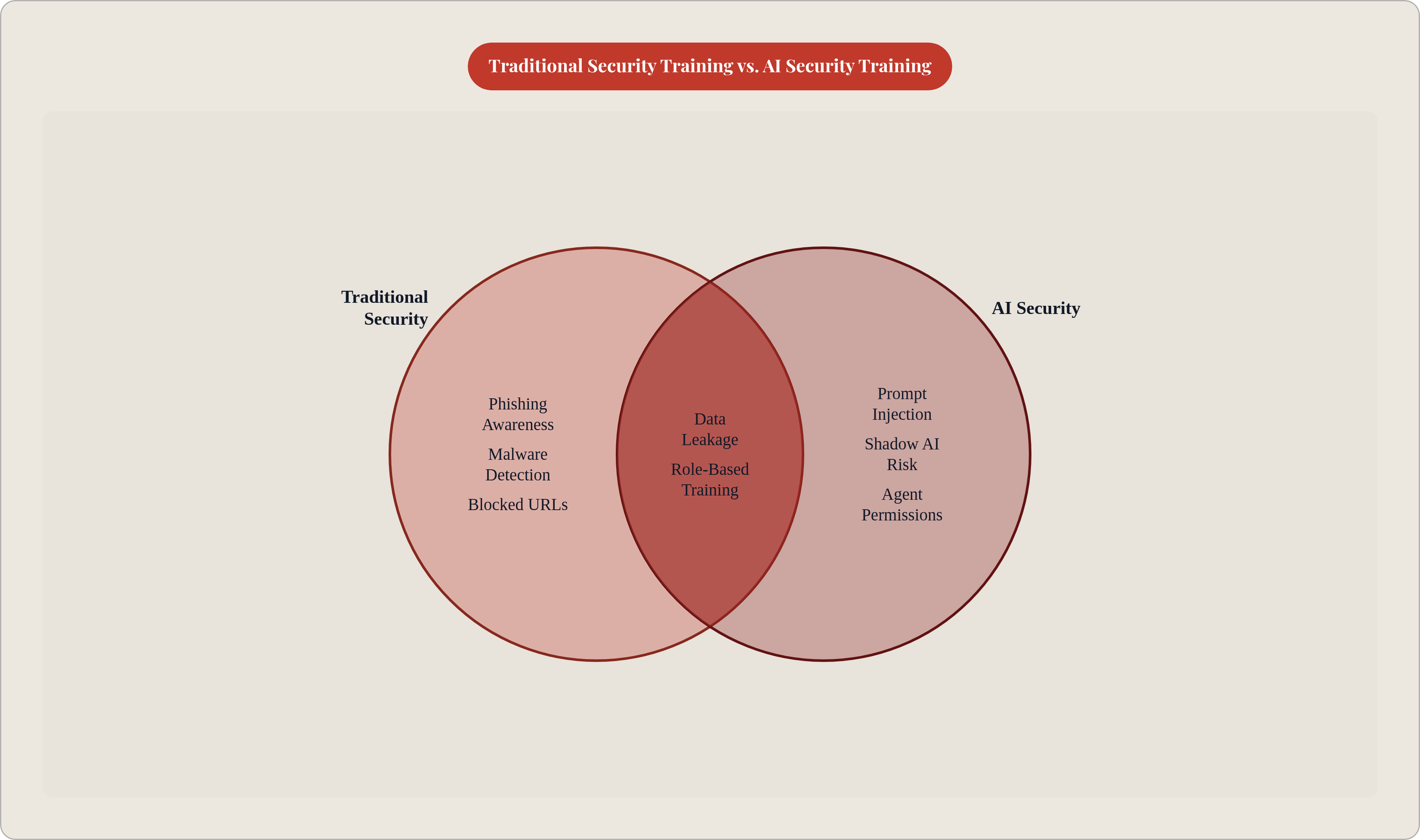
Annual compliance modules don't change behavior around AI tools. They never really did much for phishing either, but AI risk moves faster and looks different for nearly every role, so the format has to change along with the content, not just the slides.
Role-specific training beats one-size-fits-all every time. Developers need to know about secrets showing up in prompts, MCP connector hygiene, and how to scope agent permissions properly. Business users need practical guidance on classifying data, sticking to approved tools, and noticing when an agent does something it shouldn't. Managers need to understand shadow AI policy enforcement and know exactly where escalation paths lead.
Scenarios work better than reciting policy at people. Walk someone through: "your AI assistant summarized a document, then sent a follow-up email you never wrote," and watch it land harder than any bullet point about "responsible AI use" ever could. Abstract principles don't stick. A specific, slightly unsettling story does.
Frequency matters just as much as content. AI tool risk shifts faster than any yearly training cycle can keep up with, so short refreshers tied to new tool rollouts, or to whatever incident just happened somewhere in the industry, beat a single long course everyone forgets by March.
Every employee should walk away knowing exactly three things to do when something looks wrong: stop the action, preserve whatever context exists, and report it through a specific, named channel. Not a vague "contact IT," a real name, a real Slack channel, a real number to call.
Measure behavior, not attendance. Completion rates tell you people clicked through slides. What actually matters is whether shadow AI usage drops, whether anomaly reports go up, whether the volume of PII showing up in AI prompts goes down, all measured against a baseline set before training even started.
Technical controls and training are two halves of the same job. The controls shrink the damage when an employee makes a mistake. Training shrinks how often that mistake happens, and builds the instinct to catch the stuff the controls miss entirely. Skip either one, and you're running on faith.